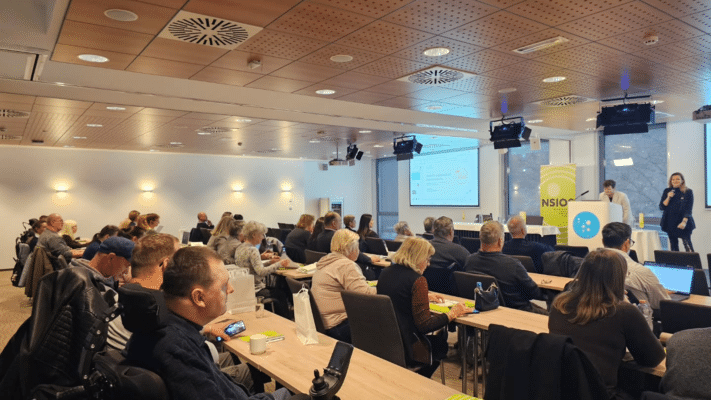
On 16 November, our CEO Jurij Oblak spoke at the annual conference of the National Council of Disability Organisations of Slovenia (NSIOS) in Thermana Laško. The conference, titled “Let’s be visible. Let’s be heard. Let’s be recognised.”, was dedicated to communication and the opportunities digitalisation brings to disability organisations.
Jurij’s talk was called “Your website speaks about you. What does it say?” The idea was simple: look at your own website through the eyes of someone who doesn’t know you yet and needs your help for the first time today.
The First Impression Starts on Google
Someone mentions your organisation over coffee. The person listening takes out their phone, types your name into Google and decides within seconds whether they’ve found what they need. Nearly 60% of web traffic worldwide now comes from phones, and the phone is also the first device Google uses to read your site. In those first seconds, a visitor checks whether the site works on a phone, when the last news item was published and whether they can find a contact straight away. An organisation can do an enormous amount of good work every day. If the last post is two years old, the visitor sees none of it.
A good home page answers three questions: who are you, what can you offer me, and how do I reach you. An invitation belongs on the page, not in a PDF attachment, which is hard to read on a phone and often unusable with a screen reader.
What Accessibility Means in Practice
According to the World Health Organisation, 1.3 billion people, or 16% of the world’s population, live with a significant disability. As communication moves online, an inaccessible website means even greater exclusion. In practice, accessibility is a blind person learning what a photo shows because it has a description, a deaf person following a video with subtitles, and someone using only a keyboard who can submit a form. It helps everyone else too: good contrast when a screen dims in the sun, big buttons when one hand is free, subtitles on the bus.
According to the WebAIM Million 2026 survey, 95.9% of a million home pages checked worldwide had at least one automatically detected accessibility error. An accessibility plugin adds buttons for contrast and text size, but doesn’t fix errors in structure, forms or image descriptions. Jurij compared it to a ramp: you can build one so steep that a wheelchair user still can’t reach the door, or one that actually works. Accessibility built into design and development from the start works. Accessibility added at the end rarely does.
A Concrete Example: nsios.si
We’ve worked with NSIOS since taking over their website maintenance. In the summer of 2022 we redesigned the site and adapted it to WCAG guidelines, and in 2024 we developed the website and mobile app for the European Disability Card, including a version in easy-to-read language.
Before the redesign, an automated check of the home page found several elements with insufficient contrast and form fields without labels, with an accessibility plugin sitting on top. Today the same check finds zero WCAG 2.1 AA errors on the home page.
Show What Your Organisation Does
Organisations have an enormous amount to show. The question is how often they publish it. After an event, a photo with a description and a few sentences is enough: what you did, who it helped, and how someone can join next time.
We’ve been blogging regularly for about two years, and organic visits to wpm.si from Google grew by 84% over two years. “When we started writing about our work, people who found us through a specific article started calling us,” says Jurij. A blog without a person to write it goes quiet after two years. Better regularly and less, than a lot and then never.
If someone needs your help for the first time today, can they take the next step on your website on their own?
Who Looks After the Site After Launch
A website is built once. After that it is either maintained or it isn’t. Neglect has concrete consequences. A member who needs help lands on an empty page. A sign-up form stops working and an event ends up half empty. Sensitive data in forms and membership records is exposed.
Three questions every organisation should be able to answer: Who is your domain registered to? Who has access to the hosting? Where are the passwords kept? Access should sit with the organisation, not with a former colleague.
Two Tests You Can Run Today
The phone test. Open your website on your phone. Find a phone number or email. Check when the last news item was published. The keyboard test. Put the mouse aside. Move through the page using Tab and Shift + Tab, confirm with Enter. Try to sign up for an event. Where did you get stuck?
The fastest fixes are usually contrast, image descriptions and a visible contact. Then give the same task to your members, because nothing about disability should be decided without people with disabilities.

Looking Ahead
A redesign doesn’t necessarily mean a large budget. For a smaller organisation, a modern WordPress site with an accessible theme and a clear structure usually falls in the range of 8,000 to 10,000 euros, and it’s worth checking public calls and co-funding options.
Thank you to NSIOS for the invitation. If you’d like us to take a look at your website, we offer a free basic accessibility review.